
Problem
When downloading Scan2Invoice, Microsoft Edge or Windows may show a warning similar to:
“Scan2Invoice-Setup.exe isn’t commonly downloaded. Make sure you trust Scan2Invoice-Setup.exe before you open it.”
or:
“Microsoft Defender SmartScreen couldn’t verify if this file is safe because it isn’t commonly downloaded.”
This message can look concerning, but it does not mean that Scan2Invoice is unsafe or that the installer is damaged.
It is a Microsoft Defender SmartScreen warning. It usually appears when an application, or a newly released version of an application, has not yet been downloaded often enough for Microsoft to classify it as commonly used.
This is more common with specialist business software like Scan2Invoice than with large consumer applications.
Cause
Microsoft Defender SmartScreen checks downloaded files and may warn you if a file is not commonly downloaded.
This can happen even when the file is legitimate, especially when:
the software is used by a smaller business audience
a new installer version has recently been published
the file has not yet built up enough download reputation with Microsoft
your company has strict browser or Windows security settings
Solution
Only continue if you downloaded Scan2Invoice from the official Scan2Invoice website.
Step 1: Open the download menu
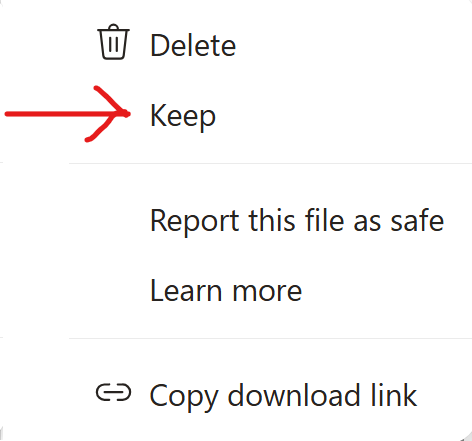
In Microsoft Edge, click the downloads icon, then click the three dots or menu option next to the Scan2Invoice installer.
Select Keep.
Step 2: Confirm that you want to keep the file
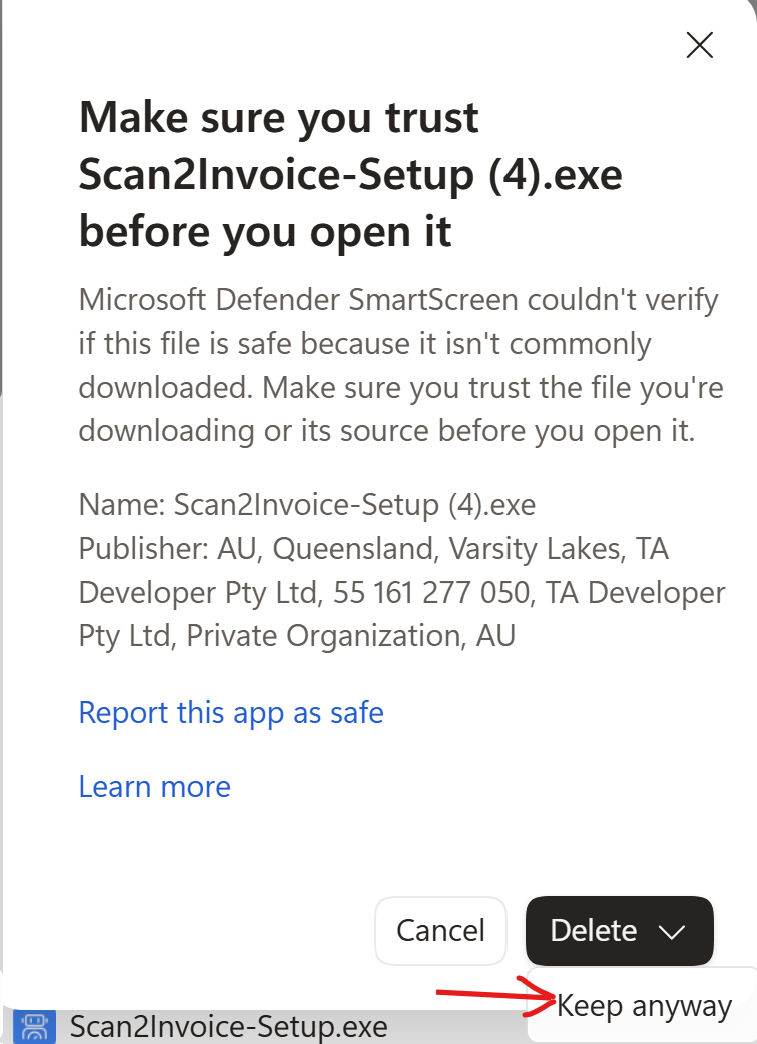
You may then see another warning saying:
“Make sure you trust Scan2Invoice-Setup.exe before you open it”
Click the arrow next to Delete, then select Keep anyway.
Step 3: Run the installer
Once the file has been kept, open Scan2Invoice-Setup.exe from your downloads folder or from the browser download bar.
Follow the installation steps as normal.
What to check before continuing
Before opening the installer, please make sure that:
you downloaded it from the official Scan2Invoice website
the file name is Scan2Invoice-Setup.exe
the publisher shown is TA Developer Pty Ltd
The publisher may be displayed as:
TA Developer Pty Ltd
or similar company/signing information depending on your version of Windows or Microsoft Edge.
What if the “Keep” or “Keep anyway” option is not available?
If these options are not available in your browser or on your computer, your organization may have restricted downloads through Microsoft Edge, Microsoft Defender, or company IT security policies.
In that case, you may need to contact your IT support team and ask them to allow the Scan2Invoice installer.
Unfortunately, this warning is generated by Microsoft Defender SmartScreen or your browser security settings and is outside our direct control.